
Top 12 Best Radio with Backup Camera You Can’t Miss
Using a cheap or ill-fitting backup camera radio often results in poor image quality or delayed response, which can create dangerous blind spots while reversing. The best radio with backup camera ensures real-time video without lag and sharp resolution, making parking and maneuvering easier. This combination reduces accidents and helps with tight parking spots, where every inch counts.
A good radio with backup camera typically features a screen size between 6 and 8 inches, offering enough visibility without obstructing the dashboard view. Compatibility with the car’s existing wiring and power system is crucial to avoid constant rebooting or dim displays.
The camera itself should have at least 480p resolution and a wide viewing angle of around 120 degrees to cover the rear space effectively. A solid construction and waterproof camera also contribute to long-term reliability.
Need a Quick Check?
| Image | Product | Price |
|---|---|---|
Our Top Picks 1  | Generic 7″ Double Din Backup | Check Price |
Our Top Picks 2  | Generic 7″ QLED Wireless CarPlay | Check Price |
Our Top Picks 3  | Podofo 7″ Backup Camera | Check Price |
Our Selected Top 12 Radio with Backup Camera Worth Your Money
This list features the best radios with backup cameras, highlighting their performance, suitability for different users, and key strengths and weaknesses. Each review provides clear insights to help you choose the right option based on your needs and preferences.
1. Generic 7 Double Din Car Stereo with Backup Camera
Built with a solid 7-inch Full HD touch screen and standard double din size, this car stereo is ideal for drivers looking for a clear display and backup camera integration. Its single biggest strength lies in the phone mirror link feature that works with both Android and iPhone, making navigation and media streaming easy on a big screen.
Setup requires checking your car’s radio size since it fits a double din slot. Connecting your phone uses a wired mirror link via a data cable, which quickly syncs music, videos, and GPS to the stereo.
Bluetooth 5.0 allows hands-free calling and audio streaming. Front and rear waterproof cameras, including night vision, bring safer parking. Steering wheel control compatibility makes it easier to manage the stereo without taking your eyes off the road.
The 45-watt, 4-channel stereo delivers clear sound for daily use. The display’s 1024×600 resolution makes media vibrant and sharp.
Build quality is dependable, though a few mention that the wired mirror link requires a specific cable and connection can sometimes be finicky. The backup camera’s night vision is useful, but image quality varies based on lighting conditions.
Clear and vibrant screen quality is the highlight, allowing easy viewing of media and navigation. The wired mirror link offers useful smartphone integration but can require patience to maintain connection. The night vision camera helps in low-light parking but sometimes shows grainy images.
Drivers wanting a budget-friendly stereo with solid smartphone support and backup safety features will find this suitable. Those preferring wireless connections or higher-resolution cameras might consider other options.
Pros
- Clear 1024×600 Full HD screen
- Supports both Android and iPhone mirror link
- Includes waterproof backup cameras with night vision
- Supports steering wheel controls
Cons
- Wired mirror link connection can be unstable
- Backup camera image quality depends on lighting
| Specification | Details |
|---|---|
| Screen Size | 7inch HD touch screen |
| Connectivity Technology | Bluetooth 5.0, Wired Mirror Link |
| Output Power | 45 watts, 4 Channel |
| Compatibility | iPhone, Android phone |
| Camera Features | Front/Rear waterproof backup camera with night vision |
2. Generic 7 QLED Double Din Car Stereo with Wireless CarPlay
A bright and colorful 7-inch QLED touchscreen immediately stands out on this double din radio, which fits perfectly for drivers wanting easy wireless smartphone use and a clear backup camera view. Its biggest strength lies in the smooth wireless Apple CarPlay and Android Auto connectivity, making phone interaction simple and safe while driving.
Installing the stereo is straightforward, and once set up, the phone syncs automatically each time you get in the car. Voice commands through Siri or Google Assistant let you handle navigation, calls, and music without touching the screen, which helps keep attention on the road. Screen mirroring and Bluetooth make it easy to play videos and stream audio, while USB and RCA connectors expand compatibility with other devices.
The 1280×720 QLED display performs well even in bright sunlight, and the wide 170-degree viewing angle ensures visibility from both driver and passenger seats. It’s solidly built and produces 240 watts of stereo output with a 4.2 surround sound channel setup.
A common compliment praises the vivid colors and clear images, while the main drawback mentioned involves occasional software quirks during wireless connection.
The display is praised for its vivid colors and visibility even in sunlight, making the backup camera feed clear and reliable. Most frustrations come from wireless connection hiccups, which can momentarily interrupt phone integration but reset by toggling connectivity options.
Anyone looking for a bright and versatile stereo to use with wireless CarPlay or Android Auto will find this fits well. Drivers wanting a rock-solid connection without depending on phone navigation might want to explore units with integrated GPS.
Pros
- Wireless Apple CarPlay and Android Auto support
- Bright 7″ 1280×720 QLED touchscreen
- 170-degree wide viewing angle for clear visibility
- 240 watts and 4.2 surround sound channels
Cons
- Occasional wireless connection glitches reported
- No built-in GPS; depends on phone for navigation
| Specification | Details |
|---|---|
| Connectivity Technology | Bluetooth, USB, Wi-Fi |
| Controller Type | Android Auto, Apple Carplay |
| Audio Output Mode | Stereo |
| Output Power | 240 watts |
| Screen Resolution | 1280×720 QLED HD |
| Viewing Angle | 170 degrees |
3. Podofo 7 Double Din Car Stereo with Backup Camera
Choosing a radio with a backup camera often comes down to how well it handles connectivity and sound power. Suited for drivers who want a multifunctional stereo system, this one stands out with a bright 7 inch HD touchscreen and solid audio output that really fills the car.
Connecting your phone with Mirror Link is easiest using the original cable, letting you smoothly control music and access apps. Day-to-day, the preset FM tuner and Bluetooth make switching between stations and hands-free calls smooth.
Inputs for USB, SD, and AUX mean playing media is straightforward. Steering wheel controls allow safe adjustments without distraction.
Audio comes through clearly with 50 watts output spread over four channels. The build feels decent for a mid-range device, though the touchscreen occasionally needs firm touches to respond well. The backup camera integration is reliable and helpful when parking.
Some users note that navigation depends entirely on phone GPS, which can cause disconnects if cables aren’t stable.
The backup camera reliably assists with reversing, and the sound fills the cabin impressively at 50 watts. Some struggle with the touchscreen’s sensitivity and occasional disconnections during navigation due to phone cable issues.
Drivers wanting easy media access and a clear display will like this setup. Those who require built-in GPS or more precise touchscreen response might need to look elsewhere.
Pros
- Bright 7 inch HD touchscreen
- Hands-free Bluetooth works well
- Backup camera input included
- Supports many media inputs
Cons
- Navigation depends on phone connection
- Touchscreen can be unresponsive at times
| Specification | Details |
|---|---|
| Controller Type | Android |
| Screen Size | 7 inch HD |
| Output Power | 50 watts |
| Connectivity Technology | Bluetooth, USB |
| Audio Output Mode | Stereo |
| Supported Internet Services | iTunes, Maps, Netflix, Spotify, YouTube |
4. CAMECHO 7 Double Din Car Stereo with Backup Camera
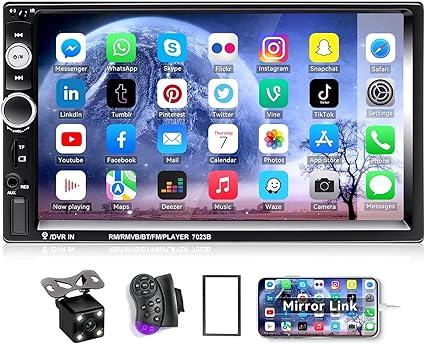
Backing up in tight spots and upgrading your dashboard both get easier with a 7 inch double din car stereo paired with a backup camera. Designed for anyone wanting clear visuals and a hands-free system, its biggest strength is the high resolution 1080P full HD touchscreen that makes driving safer and more convenient.
Getting it set up mostly involves confirming your car radio fits the 17810363mm screen and installing the included backup camera and frame. Daily use includes Bluetooth connectivity for calls and music, steering wheel control for safety, and multiple inputs like USB, TF Card, and AUX that keep your entertainment options open.
The touchscreen works well for accessing apps like Spotify and YouTube on the go.
It performs solidly as a stereo and camera combo, delivering 50 watts per channel with a 5.1 surround sound setup. The build feels sturdy enough for regular use, with a crisp screen and responsive touch controls. Praises highlight the sharp video quality and ease of connecting to devices.
Complaints most often point to restrictions around the screen size fitting some vehicle dash openings.
Clear 1080P image quality and smooth touch controls make viewing the backup camera and media enjoyable. Many find the size perfect but some face installation challenges due to the exact dimensions required for the radio opening.
Drivers wanting crisp visuals and versatile connectivity will appreciate this system. Anyone with an unusually sized dashboard or requiring more storage capacity might look for a different model.
Pros
- High resolution 1080P full HD touchscreen
- Includes backup camera and install frame
- Supports steering wheel control
- Multiple inputs: USB, TF Card, AUX
Cons
- Screen size may not fit all car dashboards
- Limited to 32 GB TF card support
| Specification | Details |
|---|---|
| Connectivity Technology | Bluetooth |
| Controller Type | Android |
| Audio Output Mode | Stereo |
| Output Power | 50 watts |
| Number of Channels | 4 |
| Total Number of HDMI Ports | 1 |
5. Generic 7 QLED Double Din Car Stereo with Wireless CarPlay

Connecting your phone wirelessly to a 7 QLED screen makes this double din stereo perfect for anyone wanting easy access to CarPlay or Android Auto without messy cables. The ultra-clear display showing maps and media in vivid detail stands out as its biggest advantage.
Setup involves a simple Bluetooth pairing, and from there the stereo handles music, calls, and navigation smoothly using voice commands via Siri or Google Assistant. The touchscreen is responsive, and you can switch between apps quickly. Watching videos in 1080P or tuning into internet services like Pandora feels straightforward thanks to clear visuals and solid connectivity through Bluetooth and Wi-Fi.
Sound quality comes from 240 watts output spread over a 4-channel system, giving decent audio power for everyday driving. The build feels sturdy and the QLED screen bright under all lighting conditions. Users often praise how sharp the display looks but sometimes mention that the interface can lag during heavy app use or video playback.
It delivers well on its core functions.
The most frequent praise highlights the clear, bright QLED screen that makes following maps and watching videos enjoyable. Some reviews comment on occasional lag when running multiple apps or playing high-definition videos, which can interrupt the experience. Sound power and wireless connectivity meet daily driving needs well.
Those relying heavily on wireless phone connections and high-quality visuals will find this a solid fit. Drivers wanting a simple upgrade with good multimedia features will be satisfied. Someone needing flawless performance under all conditions or advanced camera integration might want to explore other options.
Pros
- Wireless CarPlay and Android Auto connectivity
- Vivid 7″ QLED display with 1280×720 resolution
- 240 watts total output power for good sound
- Supports popular internet services like Pandora, YouTube
Cons
- Interface can lag during intense video or app use
- Limited complaint data on backup camera integration
| Specification | Details |
|---|---|
| Output Power | 240 watts |
| Screen Size | 7″ QLED |
| Display Resolution | 1280×720 |
| Connectivity Technology | Bluetooth, Wi-Fi |
| Supported OS | Android, iOS |
| Video Playback | Supports 1080P |
6. Generic 7 Double Din Car Stereo with Dash Cam and Wireless CarPlay

Great for drivers who want easy smartphone integration and clear sound, this 7 inch Double Din Car Stereo pairs well with anyone wanting wireless Apple CarPlay or Android Auto alongside backup camera support. Its biggest strength is quick and cable-free connection to your phone right when you hop in the car.
Setup takes just a bit of time connecting the unit to your car and syncing your phone. Wireless CarPlay and Android Auto automatically link up via Bluetooth or Wi-Fi, so you don’t need to plug in every time. Touch controls and voice commands let you handle calls, messages, music, and navigation right from the dash.
You get built-in AM/FM radio plus access to popular apps like Pandora and YouTube.
Audio sounds powerful with 240W output spread across four channels and two subwoofer outs for richer bass. The car stereo’s build feels solid, with a clear, responsive touchscreen and decent remote control. Most users appreciate how easily the wireless smartphone connection works.
Some mention occasional lag in the touchscreen response as a downside but that’s not common.
Many appreciate how easily the unit connects wirelessly to phones, removing the hassle of cables. The sound system delivers impressive bass and clarity with multiple subwoofer outputs. On the downside, a few find the touchscreen slow to react sometimes during use.
Anyone wanting wireless smartphone features and good sound quality will find it a solid pick. Drivers needing the most responsive UI or higher wattage output might explore other options better suited for more demanding setups.
Pros
- Wireless CarPlay and Android Auto connection
- 240W 4.2-Channel audio output for rich sound
- Separate subwoofer outputs for deeper bass
- Compatible with popular streaming apps
Cons
- Occasional touchscreen lag reported
- Output power limited to 60 watts per channel
| Specification | Details |
|---|---|
| Connectivity Technology | Bluetooth, USB, Wi-Fi |
| Controller Type | Android, iOS |
| Output Power | 60 watts |
| Number of Channels | 4 |
| Audio Output Mode | Stereo |
7. Generic 7 Wireless Double Din Car Stereo with Backup Camera
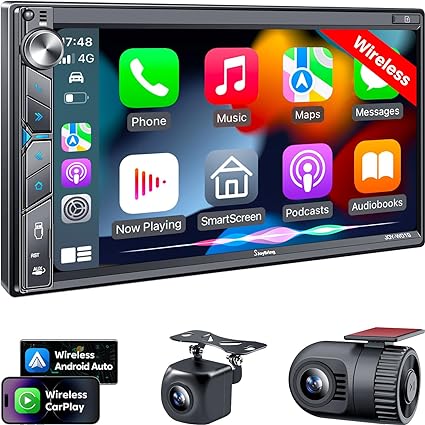
Wireless Apple Carplay and Android Auto set this double din car stereo apart for drivers wanting easy, hands-free access to their phones. It suits those who prioritize safety and convenience on the road, offering a solid backup camera alongside impressive sound capabilities.
Its biggest strength is combining wireless connectivity with a clear, functional backup video feed.
Setup mainly involves pairing your smartphone via Bluetooth or Wi-Fi, which takes a few moments but stays reliably connected after that. Daily use is smooth thanks to voice control with Siri or Google Assistant, making calls and navigating maps without distraction.
Adjusting audio is simple with tone control, and the wireless backup camera automatically switches on when reversing, which adds extra confidence in parking situations.
Sound quality is satisfying with 4.2 channel output, providing balanced front and rear speakers plus powerful subwoofer support. The stereo handles multiple media formats like MPEG-4 and AVI, with clear video playback on-screen. It’s built solidly with RCA connections and a responsive touchscreen.
The most common complaint involves occasional lag in wireless connection, though most find it dependable for regular use.
Wireless connection works well most of the time, but some experience lag during use. The backup camera display engages promptly, making reversing safer and more intuitive. Audio output offers powerful bass and clear sound, which fits many in-car listening preferences.
People wanting easy wireless smartphone integration paired with a decent backup camera will be satisfied. Those who prioritize flawless wireless performance or quick setup might want to consider alternatives.
Pros
- Wireless Apple Carplay and Android Auto support
- 4.2 channel output with strong bass
- Built-in backup camera with automatic display
- Multiple control options including voice commands
Cons
- Occasional lag in wireless connection reported
- Setup may take extra time for first use
| Specification | Details |
|---|---|
| Output Power | 240 watts |
| Connectivity Technology | Bluetooth, Wi-Fi |
| Audio Output Mode | Stereo |
| Surround Sound Channel Configuration | 4.2 |
| Control Method | Remote, Touch, Voice |
| Video Encoding | MPEG-4, RMVB, DivX, AVI, 1080P |
8. Generic 7 Double Din Car Stereo with Wireless CarPlay

Generic 7 Double Din Car Stereo with Wireless CarPlay suits drivers looking for smooth smartphone integration and strong audio performance. It stands out for its wireless and wired Apple CarPlay and Android Auto that connect automatically, making hands-free control simple and safe while driving.
Setting up is straightforward with compatibility for iPhone and Android devices. Daily use benefits from voice commands using Siri or Google Assistant, so you can handle navigation, calls, messages, and music without taking your eyes off the road. Its wireless connection means no cables cluttering the dashboard, though wired options are also available for flexibility.
Sound quality is clear and powerful, thanks to a built-in DSP processor and 240 watts max output across five channels. The 10-band EQ lets you fine-tune audio, and the subwoofer output adds deep bass. The large rear heat sink helps keep it cool during extended use.
Most praise focuses on its audio clarity while a common complaint is occasional complexity in menu navigation.
Users appreciate the crystal-clear audio performance and easy voice command access via Siri or Google Assistant. Some find navigating the menus less intuitive, which may require extra time to master.
This unit delivers solid audio features and smooth smartphone connectivity for drivers. Those seeking a simpler interface or detailed screen info might look for alternatives.
Pros
- Wireless and wired CarPlay/Android Auto support
- Built-in DSP and 10-band EQ customize sound
- Subwoofer output for rich bass
- Automatic phone connection at startup
Cons
- Menu navigation can be complicated
- No detailed touchscreen size provided
| Specification | Details |
|---|---|
| Connectivity Technology | Auxiliary, Bluetooth, USB |
| Controller Type | Android, iPhone |
| Output Power | 240 watts |
| Number of Channels | 5 |
| Other Special Features | Android Auto, Apple CarPlay, Voice Control |
| Connector Type | 3.5mm external mic jack, RCA |
9. Generic 7 Wireless Double Din Car Stereo with Wireless CarPlay

Setting up a solid connection with your phone the moment you start driving feels like it changes everything. Suited for those who want easy, wireless access to navigation and music, this double din radio makes staying connected simple, with wireless Apple CarPlay and Android Auto taking center stage.
Installation requires fitting the double din size into your dashboard and pairing your phone once. After that, the stereo takes over, connecting wirelessly to your device every time the car starts.
Voice commands make calling friends or navigating with Google Maps or Waze hands-free. Streaming music from Spotify feels smooth, and screen mirroring adds flexibility on top of the basics.
The sound quality stands out thanks to the built-in digital signal processor and 240 watts output across four channels, letting you adjust audio balance around the car. Build quality matches the technical specs but some mention the screen or connection occasionally glitches. Most users praise the automatic wireless connection as the biggest convenience; some find occasional hiccups in responsiveness frustrating.
Users appreciate how the stereo automatically connects wirelessly to their phones, making it easy to launch apps hands-free right after starting the car. At the same time, some experience periodic screen glitches and occasional slow response from the system, which can interrupt the flow.
People who want quick hands-free smartphone access without plugging cables will benefit here. Those looking for a perfectly stable, glitch-free screen experience might want to consider other options better known for consistent display performance.
Pros
- Automatic wireless connection to phones
- Built-in DSP for adjustable sound quality
- Supports both Apple CarPlay and Android Auto
- Handles multiple audio and video formats
Cons
- Screen sometimes experiences occasional glitches
- Connection can be unresponsive at times
| Specification | Details |
|---|---|
| Connectivity Technology | Auxiliary, Bluetooth, USB |
| Controller Type | Android Auto, Apple CarPlay |
| Output Power | 240 watts |
| Number of Channels | 4 |
| Other Special Features | Android Auto, Apple CarPlay, Built-In Bluetooth, DSP, Screen Mirroring |
10. UNITOPSCI 7 Double Din Car Stereo with Backup Camera

Great value for anyone needing a 7-inch double din car stereo with a backup camera. Suits drivers wanting a clear, functional screen with solid Bluetooth connectivity and decent audio power. Its biggest strength is combining a backup camera input with a 4x45W amplifier, delivering clear sound and improved safety while driving.
Setup is straightforward for those with a compatible dashboard size, fitting into standard 7-inch slots without fuss. Using the touchscreen is simple for radio and media controls.
Bluetooth lets you stream music and make hands-free calls easily, while the steering wheel controls remain functional. Mirror link supports smartphone integration, enhancing convenience on the daily commute or longer trips.
Sound quality is clear with 50 watts output and a 4-channel stereo setup, handling most music well. The backup camera input works reliably, aiding in parking and reversing safely.
Build feels solid, but some note the touch screen could be more responsive. The radio tuner is reliable, but a few mention the screen glare in bright sunlight as a downside.
The backup camera input works dependably and integrates easily with the touchscreen setup, improving reversing safety. Most users appreciate the audio power and Bluetooth features, though some find the touchscreen less responsive and a bit reflective in bright conditions.
Best suited for drivers looking for a combination of radio, Bluetooth, and rear camera at a reasonable price. Anyone needing a highly responsive touchscreen or brighter screen might want to consider a different model.
Pros
- Clear 7-inch digital touch screen
- Built-in Bluetooth for hands-free calls
- Backup camera and dash cam input
- 4x45W amplifier for decent audio power
Cons
- Screen can reflect sunlight, reducing visibility
- Touch response sometimes less sensitive
| Specification | Details |
|---|---|
| Output Power | 50 watts |
| Number of Channels | 4 |
| Connectivity Technology | Auxiliary, Bluetooth, USB |
| Controller Type | Android |
| Screen Size | 7.0 inch HD touch screen |
| Supported Internet Services | Itunes, Maps, Netflix, Spotify, Youtube |
11. Pioneer DMH-130BT 6.8 Double Din Car Stereo

A solid build and a 6.8 capacitive touchscreen make this double din stereo a great fit for drivers wanting clear visuals and reliable connectivity. Designed for users who appreciate hands-free control and a good backup camera input, it combines Bluetooth and Alexa support to handle music and calls smartly on the road.
Setting it up is straightforward thanks to RCA connectors and compatibility with both Android and iOS smartphones. Daily use centers on the responsive touchscreen where you control music and make calls via Bluetooth. Alexa integration requires apps but adds another control option.
The multi-color illumination lets you adjust the look to your liking, while the rear view camera input offers safer reversing.
The stereo offers clear audio output with four channels at 50 watts each, providing consistent, loud sound. Its construction feels durable and the screen responds well to touch inputs. Most praise revolves around smooth Bluetooth streaming and call quality.
Some users mention occasional setup quirks with Alexa and the apps involved, which can take a bit of trial and error.
Bluetooth streaming and call quality are consistently praised for their reliability and clarity. Alexa’s voice controls work once set up but require a learning curve due to app dependencies and occasional connectivity hiccups.
People who want simple Bluetooth functions and a good touchscreen will find this stereo meets their needs. Those seeking plug-and-play voice assistant integration without extra apps might prefer other models.
Pros
- Clear, responsive 6.8″ capacitive touch screen
- Bluetooth for hands-free calls and streaming
- Supports Amazon Alexa via Vozsis app
- Multi-color illumination customization
Cons
- Alexa setup requires installing two apps
- Minor glitches reported with Alexa connectivity
| Specification | Details |
|---|---|
| Connectivity Technology | Bluetooth |
| Controller Type | Amazon Alexa, Android, iOS |
| Display Size | 6.8″ Capacitive Touch Screen |
| Output Power | 50 watts |
| Rear View Camera Input | Yes |
12. Generic Double Din Car Stereo with Apple CarPlay and Android Auto

Big, clear touchscreen stands out right away, making it great for anyone who wants easy access to phone apps and navigation while driving. It works well for people using either Apple CarPlay or Android Auto, letting you control calls, maps, and music without too much distraction.
Setting up takes just a USB connection to your phone, and the system quickly links with both iPhones and Android devices. The touchscreen responds well, and Google Assistant makes it simple to get directions or send messages hands-free. Mirror Link keeps your phone’s screen mirrored if needed, so you can use navigation apps not built into CarPlay or Android Auto.
Daily drives feel safer with quick access to real-time alerts and voice commands.
Sound quality holds up with 60 watts output across 4 channels, giving decent surround sound for the price. The build feels solid, though the touchscreen can sometimes lag a bit when launching certain apps. Most praise focuses on how smoothly it connects to phones and handles calls.
A common complaint is occasional Bluetooth dropouts that interrupt music playback.
Many users appreciate how smoothly the stereo pairs with phones and the convenience of voice control for maps and calls. However, interruptions due to Bluetooth dropouts and occasional touchscreen lag are frequently mentioned.
People wanting a simple, phone-integrated double din radio with backup camera support will find this unit helpful. Those prioritizing flawless Bluetooth performance or faster touchscreen response might look for higher-end options.
Pros
- Compatible with both Apple CarPlay and Android Auto
- Clear, responsive touchscreen control
- Built-in Google Assistant for hands-free use
- Supports mirror link for most phones
Cons
- Bluetooth connection sometimes drops during playback
- Touchscreen can lag when opening apps
| Specification | Details |
|---|---|
| Connectivity Technology | Auxiliary, Bluetooth, RCA, USB |
| Controller Type | Google Assistant, iOS |
| Output Power | 60 watts |
| Audio Output Mode | Surround |
| Number of Channels | 4 |
Comparison of Best Radios with Backup Cameras
| Product | Screen Size | Connectivity | Controller Type | Special Features |
|---|---|---|---|---|
| Generic 7″ Double Din Backup | 7″ HD touch screen | Bluetooth | Android, iOS | Rear/front waterproof camera |
| Generic 7″ QLED Wireless CarPlay | 7″ QLED | Bluetooth, USB, Wi-Fi | Android Auto, Apple CarPlay | Android Auto, Apple CarPlay |
| Podofo 7″ Backup Camera | 7 | Bluetooth, USB | Android | Touchscreen |
| CAMECHO 7″ Backup Camera | 7 | Bluetooth | Android | Touchscreen, HDMI port |
| Generic 7″ QLED Wireless CarPlay | 7″ QLED | Bluetooth, Wi-Fi | Android, iOS | Android Auto, Apple CarPlay |
| Generic 7″ Dash Cam Wireless | 7 | Bluetooth, USB, Wi-Fi | Android, iOS | Android Auto, Apple CarPlay |
| Generic 7″ Wireless Backup | 7 | Bluetooth, Wi-Fi | Android, iOS | Front/rear camera input |
| Generic 7″ Wireless CarPlay | 7 | Auxiliary, Bluetooth, USB | Android, iPhone | Voice Control |
| Generic 7″ Wireless Wireless CarPlay | 7 | Auxiliary, Bluetooth, USB | Android Auto, Apple CarPlay | Android Auto, Apple CarPlay |
| UNITOPSCI 7″ Backup Camera | 7 | Auxiliary, Bluetooth, USB | Android | Hands-Free Calling |
| Pioneer DMH-130BT 6.8 | 6.8″ capacitive | Bluetooth | Alexa, Android, iOS | Rear view camera input |
| Generic Double Din CarPlay Auto | – | Auxiliary, Bluetooth, RCA, USB | Google Assistant, iOS | Surround Sound Channel |
- Screen Size7″ HD touch screen
- ConnectivityBluetooth
- Controller TypeAndroid, iOS
- Special FeaturesRear/front waterproof camera
- Screen Size7″ QLED
- ConnectivityBluetooth, USB, Wi-Fi
- Controller TypeAndroid Auto, Apple CarPlay
- Special FeaturesAndroid Auto, Apple CarPlay
- Screen Size7
- ConnectivityBluetooth, USB
- Controller TypeAndroid
- Special FeaturesTouchscreen
- Screen Size7
- ConnectivityBluetooth
- Controller TypeAndroid
- Special FeaturesTouchscreen, HDMI port
- Screen Size7″ QLED
- ConnectivityBluetooth, Wi-Fi
- Controller TypeAndroid, iOS
- Special FeaturesAndroid Auto, Apple CarPlay
- Screen Size7
- ConnectivityBluetooth, USB, Wi-Fi
- Controller TypeAndroid, iOS
- Special FeaturesAndroid Auto, Apple CarPlay
- Screen Size7
- ConnectivityBluetooth, Wi-Fi
- Controller TypeAndroid, iOS
- Special FeaturesFront/rear camera input
- Screen Size7
- ConnectivityAuxiliary, Bluetooth, USB
- Controller TypeAndroid, iPhone
- Special FeaturesVoice Control
- Screen Size7
- ConnectivityAuxiliary, Bluetooth, USB
- Controller TypeAndroid Auto, Apple CarPlay
- Special FeaturesAndroid Auto, Apple CarPlay
- Screen Size7
- ConnectivityAuxiliary, Bluetooth, USB
- Controller TypeAndroid
- Special FeaturesHands-Free Calling
- Screen Size6.8″ capacitive
- ConnectivityBluetooth
- Controller TypeAlexa, Android, iOS
- Special FeaturesRear view camera input
- Screen Size–
- ConnectivityAuxiliary, Bluetooth, RCA, USB
- Controller TypeGoogle Assistant, iOS
- Special FeaturesSurround Sound Channel
How to Choose the Right Radio with Backup Camera
Look for a radio with a clear, responsive display and reliable camera quality to ensure safety and ease of use. Compatibility with your vehicle and simple installation also matter, as choosing the right features helps avoid costly upgrades and technical issues later.
Display Quality and Size
Backing up in low light or bright sunlight can be tricky without a clear screen. A display with a resolution of at least 800×480 pixels tends to show sharper images from the camera, making it easier to see obstacles.
Smaller screens, under 6 inches, might fit well on cramped dashboards but can make details harder to spot, while displays around 7 inches hit a good balance for visibility and space. Screen brightness that adjusts automatically, or manually, helps maintain image clarity whether parked under a tree or in direct sun.
Touch responsiveness can vary widely. A sluggish screen makes quick adjustments frustrating, especially when backing out of tight spots. Look for a display that reacts immediately to your taps and swipes to change views or zoom in on the backup feed.
Features like anti-glare coatings can reduce reflections but might slightly dull colors, so the right compromise depends on your typical driving conditions.
Camera Compatibility and Connectivity
Backup camera setups differ a lot. Some systems work only with specific camera brands or wired connections. A system supporting standard video inputs like RCA will offer more flexibility to use cameras from different makers.
Wireless connections add convenience, but reliability can take a hit if the signal cuts out or lags, which can be problematic in real-world parking situations.
Ease of installation matters, especially if you have multiple cameras or existing dash cams. Some radios allow input from several cameras at once, useful for 360-degree views or blind spot monitoring.
Clear instructions and simple plug-and-play connectors save hours of frustration. Checking for compatibility with your car’s wiring system upfront prevents incompatible combos that waste both time and money.
Audio and Radio Performance
Sound quality in these radios often surprises. Good speakers or an external amplifier help, but the radio itself should allow separate adjustments of bass, treble, and mid-range for clearer call audio and music.
Radios with weak audio settings tend to sound tinny or flat, which gets old fast on longer drives.
Strong radio reception keeps local stations clear without static. Radios that support multiple bands, FM, AM, and digital ones like DAB where available, provide more listening options. Bluetooth integration is a practical feature.
It allows hands-free calls and plays music from your phone without extra wiring. Some models even let you control streaming apps directly through the radio interface.
User Interface and Controls
An intuitive user interface can prevent distractions. Menus that let you switch views or toggle settings in two or three taps keep your focus on driving.
Complex menus buried under many layers slow reactions and can cause errors while multitasking behind the wheel.
Physical buttons generally provide quicker access for common functions, especially when driving. Touchscreens look modern but sometimes require you to look down to tap the right spot.
Compatibility with steering wheel controls and voice commands allows you to keep your hands on the wheel and eyes on the road. Both are practical advantages that reduce driver distraction and increase safety.
Durability and Installation
Car interiors demand durable equipment. Radios that feel solid and are built with good-quality plastics or metal parts last longer under constant vibration and temperature swings seen on the road.
Flimsy buttons or loose ports often become failure points after a year or two.
Installation can vary greatly depending on your car. Radios that come with universal mounting kits or adapters save you from custom modifications.
Resistance to dust, heat, and moisture helps prevent malfunctions caused by common environmental factors. A well-built unit installed properly avoids common headaches that arise from poor fit or exposure to harsh conditions.
Maximizing Safety: How to Effectively Use Your Radio with Backup Camera
Backup cameras paired with a radio help drivers see blind spots directly behind their vehicles, making parking safer and reversing less stressful. The best use of these systems involves regularly cleaning the camera lens to maintain a clear view, especially after rain or snow.
Adjusting the screen brightness and contrast within the radio settings ensures the image is visible under different lighting conditions, such as bright sunlight or darkness.
Tips for effective use:
- Check the camera view before moving backward, but don’t rely solely on it; always glance over your shoulder too.
- Use on-screen guidelines to judge distance accurately but know their limits depending on your vehicle model.
- Keep the software or firmware of the radio updated; manufacturers often release improvements for better camera integration.
Keeping these points in mind can reduce accidents caused by unseen obstacles and improve your overall driving safety.
Common Installation Mistakes to Avoid for Optimal Performance
Installing a radio with a backup camera requires attention to detail to avoid common pitfalls that affect performance. One frequent mistake is improper wiring connections, which can cause the camera to flicker or not display consistently.
Avoid routing power cables near high-interference devices like the engine control unit to prevent signal noise.
Mounting the camera in the wrong position is another issue; placing it too high or angled incorrectly may give a distorted or incomplete rear view. The camera should be centered and aimed to cover the area immediately behind the vehicle.
Other errors to watch for:
- Failing to ground the camera properly, leading to intermittent display problems.
- Neglecting to check camera compatibility with the radio system before purchase.
- Not securing cables firmly, which can cause disconnections from vibration while driving.
Following proper installation steps helps ensure a reliable image and long-term function.
Comparing Factory vs. Aftermarket Radios with Backup Cameras
Factory radios with backup cameras are designed specifically for your vehicle model, usually offering a tightly integrated look and straightforward operation through existing controls. These systems often come with built-in features like parking sensors and calibrated guidelines tailored for the car’s dimensions.
Aftermarket options provide more flexibility. They often include larger screens, touchscreen controls, and compatibility with multiple camera types from various manufacturers.
This allows upgrades for older vehicles or adding advanced features like split-screen views or night vision.
Considerations when choosing between them:
- Factory units can be easier to install with plug-and-play connections.
- Aftermarket radios may require more complex wiring and mounting but offer broader customization.
- Cost differences vary; aftermarket models range widely in price depending on features.
Deciding depends on your budget, desired features, and how much modification you are willing to undertake.
People Also Asked
How Do I Connect a Backup Camera to My Radio?
Most backup cameras connect to your radio via an RCA video input or a dedicated camera input on the head unit. Check your radio’s manual for the exact connection type. Running power and video cables from the rear of your car to the radio usually involves routing wires under trim panels.
What Size Radio Fits with My Car’s Dashboard?
Radios come in single-DIN or double-DIN sizes, with double-DIN being twice the height. Measure the height and width of your car’s current radio opening to confirm fit. Some vehicles require an installation kit or trim bezel to fill gaps around the new radio.
Are Backup Cameras Safe to Use While Driving?
Backup cameras activate only when the vehicle is in reverse gear, so they do not display video while driving forward. The camera view helps avoid obstacles while backing up but does not replace attentive driving. Keep the camera lens clean for the best image quality.
How Long Do Backup Camera Systems Usually Last?
Backup camera systems generally last around 5 to 10 years depending on exposure to weather and quality of the camera components. Frequent moisture or dirt can reduce the camera’s lifespan. Proper installation and sealing of wiring connections also help maintain system durability.
What Common Problems Do Radios with Backup Cameras Have?
Common problems include poor image quality, laggy video feed, or no picture appearing on the radio screen. These issues often result from loose connections, damaged cables, or low power supply. Regular inspection of cables and cleaning of the camera lens can prevent many issues.
Conclusion
Choosing the best radio with a backup camera means focusing on a clear display that lets you see what’s behind you, easy controls for safe operation while driving, and a reliable camera that works well in different lighting conditions. Compatibility with your vehicle and straightforward installation also play a big role.
These factors ensure the system is practical and useful every time you reverse.
Think about the space available on your dashboard and how often you’ll rely on the backup camera to pick a model that fits your needs and budget. The comparison table and detailed picks above offer a good reference to weigh those points and find what works best for you. Matching the right features to your daily routine makes all the difference in the long run.

I’m Tyler Brooks, a car care and automotive writer who loves keeping vehicles clean, protected, and running smoothly. I cover detailing techniques, paint protection, interior cleaning, fluid checks, and easy DIY maintenance. I create practical guides that help everyday drivers take care of their cars inside and out without spending a fortune.