
Top 12 Best Portable Dash Cam That Will Blow Your Mind!
Driving without a reliable recording device can turn a minor bump into a big headache. Many drivers find that a cheap or poorly designed dash cam either records unclear footage or stops working when temperatures drop.
A best portable dash cam solves these problems by being easy to mount, durable in different weather conditions, and consistently capturing clear video without fail.
Key factors that set the best portable dash cam apart include video resolution, storage capacity, and power source. Look for models that record at least 1080p for clarity, with a memory card slot supporting up to 128GB or more to avoid frequent file transfers. Battery life and hardwiring options are important; a good portable dash cam should run reliably on battery power for several hours or connect effortlessly to your vehicle’s power to keep running while parked.
Need a Quick Check?
| Image | Product | Price |
|---|---|---|
Our Top Picks 1  | 4K Front Mini Dash Cam | Check Price |
Our Top Picks 2  | 4K Dual Dash Cam | Check Price |
Our Top Picks 3  | 70mai A810 Lite Dash Cam | Check Price |
Our Selected Top 12 Portable Dash Cam Worth Your Money
This list features carefully chosen portable dash cams designed for various needs and budgets. Each review explains how the device performs, highlights its advantages and drawbacks, and suggests who might benefit most from using it, helping you make an informed decision.
1. 4K Dash Cam Front Mini
Easy to set up and discreet on the windshield, this dash cam suits anyone wanting high-quality footage without bulk. Its biggest strength lies in capturing crystal-clear 4K video, making it an excellent choice for someone focused on detailed recordings of their drives.
Setup involves a simple adhesive mount and connecting to your phone via built-in 5G WiFi. The included 32GB memory card works right away, so no extra purchases are needed initially. Day-to-day use involves app control for reviewing footage and settings, loop recording for continuous capture, and voice recording to catch sounds inside the car.
With a 160-degree wide-angle lens and 4K resolution, video quality is consistently sharp and detailed. The dash cam records incidents automatically with the G-sensor and locks accident footage to prevent overwrites. It’s built to stay discreet without a display on the device itself.
Some users mention the reduced 32GB memory capacity as a limit for longer trips before needing an upgrade.
The dash cam delivers high-resolution, clear video and reliable accident locking, but users often note its included 32GB memory fills up faster than larger cards would. Built without a screen, it needs app usage for all controls and viewing, which might not suit everyone.
It works great for those wanting quality video with minimal gadget bulk who prefer phone control. Anyone needing longer continuous recording or direct on-device viewing should consider alternatives offering higher memory capacity and built-in displays.
Pros
- Includes 32GB memory card for immediate use
- Sharp 4K video quality for clear footage
- Built-in 5G WiFi allows easy app connectivity
- Discreet design without a display
Cons
- 32GB memory card may fill quickly on long drives
- No display limits on-device preview of footage
| Specification | Details |
|---|---|
| Video Capture Resolution | 2160p |
| Field Of View | 160 degrees |
| Connectivity Technology | Wi-Fi |
| Flash Memory Type | microSD |
| Mounting Type | Adhesive Mount |
| Control Method | App |
2. 4K Dual Dash Cam
4K Dual Dash Cam offers dual 4K UHD recording, making it a solid pick for drivers who want detailed video evidence from both front and rear views. Its strongest point lies in crystal-clear video capture, suitable for cars and trucks aiming to cover every angle on the road.
Setup is straightforward, with dashboard mounting and app control allowing quick adjustments and access to footage. The built-in Wi-Fi (5.8GHz WIFI6) lets you easily download videos without removing the memory card. A free 128GB card comes included, supporting plenty of storage, and it accepts microSD cards up to 512GB for extended recording needs.
Video quality is sharp thanks to the true 4K resolution front and rear, paired with a wide 170° front viewing angle, so nothing important is missed. The cameras handle low light well with large apertures (F1.5 front, F1.8 rear) boosting night vision clarity.
The casing is durable against heat and cold, built for tough conditions. Common praise highlights video quality while the frequent criticism concerns occasional app connectivity quirks.
High-resolution footage impressed many for capturing clear, wide-angle views day or night. Some experience occasional issues when connecting through the app to view or download videos. The camera withstands temperature changes well, which suits different climates.
Those requiring excellent night video and dual angles will find it valuable, especially with large storage options included. Drivers wanting a larger display or flawless app experience might want to explore alternatives better suited to those needs.
Pros
- True 4K recording front and rear
- Strong low-light performance with large apertures
- Supports up to 512GB external storage
- Included 128GB memory card ready to use
Cons
- App connectivity can be unreliable at times
- Small 3-inch screen limits in-device viewing
| Specification | Details |
|---|---|
| Video Capture Resolution | 4K Front + 4K Rear |
| Field Of View | 170 degrees |
| Connectivity Technology | Bluetooth, Wi-Fi |
| Control Method | App, Push Button |
| Flash Memory Type | microSD |
| Screen Size | 3 inches |
3. 70mai A810 Lite 4K Front and Rear Dash Cam
Compact and thoughtfully designed for easy mounting on your windshield, the 70mai A810 Lite 4K Front and Rear Dash Cam suits drivers wanting sharp video both ahead and behind. Its key strength lies in ultra-high resolution 4K front recording that captures crystal-clear details critical for any incident on the road.
Setup involves sticking the dash cam and rear camera in place plus connecting power through USB. Day-to-day operation relies on its 3.18-inch screen, voice commands, or a smart app, making control flexible. Features like loop recording and 24H parking mode provide continuous protection without manual interference, while GPS and Wi-Fi 6 keep data connected and accurate.
Recording quality stands out with ultra HD front footage and reliable 1080P rear coverage, providing great detail like license plates even at night thanks to HDR and a large F1.55 aperture. The build feels solid with a supercapacitor for durability. Most praise highlights crisp video clarity, and some note occasional app connectivity quirks as the main nuisance.
Crystal-clear 4K footage and effective night vision receive the most praise, providing confident recording day or night. The most common complaint involves intermittent difficulties connecting through the smart app, which can disrupt remote access to recordings.
Ideal for commuters, rideshare drivers, or families who want reliable front and rear recording with nighttime clarity. Those unwilling to troubleshoot app connections or in need of internal storage might consider alternatives.
Pros
- 4K Ultra HD front camera captures clear details
- Dual front and rear recording boosts road safety
- Advanced night vision with HDR and large aperture
- Multiple control options including voice and app
Cons
- Occasional app connection issues reported
- No mention of internal memory; requires microSD
| Specification | Details |
|---|---|
| Video Capture Resolution | 1080p, 2160p |
| Connectivity Technology | 5GHz Wi-Fi 6, USB |
| Control Method | App, Push Button, Voice |
| Field Of View | 140 degrees |
| Special Features | 24H Parking Mode, G-Sensor, Loop Recording, GPS, 4G LTE Support |
4. Garmin Dash Cam Mini 3

Ultracompact and key-sized, this dash cam is perfect for drivers who want reliable recording without a bulky device on their windshield. Its biggest strength lies in staying out of sight while continuously capturing clear footage, especially useful for incidents requiring precise date and time evidence.
Setup is straightforward, with a simple windshield mount that keeps the camera nearly invisible. Connecting the dash cam to your smartphone using Bluetooth or Wi-Fi makes accessing videos simple and quick. Voice controls add convenience, and the Garmin Clarity polarizer lens helps reduce glare, so recorded details remain visible in different lighting conditions during daily drives.
The camera captures crisp 1080p HD video at 24 frames per second with a wide 140-degree view, delivering clear recordings of the road ahead. It automatically saves clips when incidents are detected, making review quick.
Built solid with a small, lightweight frame and a 2.4-inch LCD screen, it’s neat and reliable. A common critique is the limited battery life, which means it relies mostly on constant vehicle power.
Many highlight the camera’s excellent video clarity and discreet size, making it easy to forget it’s even there. However, relying on the car’s power source because of limited internal battery can be inconvenient for some users.
Drivers wanting a compact, always-on recorder that pairs with a smartphone will find this camera suits them well. Those needing extended battery use or facing legal restrictions should explore other options.
Pros
- Ultracompact size unobtrusive on windshield
- Clear 1080p video with wide 140-degree view
- Built-in polarizer lens reduces glare well
- Easy smartphone connectivity via Bluetooth and Wi-Fi
Cons
- Limited battery life requires vehicle power
- Some jurisdictions restrict or prohibit use
| Specification | Details |
|---|---|
| Video Capture Resolution | 1080p |
| Field Of View | 140 degrees |
| Connectivity Technology | Bluetooth, USB, Wi-Fi |
| Control Method | Voice |
| Screen Size | 2.4 inches |
| Memory Slots Available | 1 |
5. ROVE R2-4K Dual Dash Cam

Upscaled 4K video quality for both front and rear views sets this dash cam apart, ideal for drivers who want detailed footage beyond standard Full HD. It fits well for those wanting a reliable dual camera setup with good night vision and app control.
Mounting it on the windshield is straightforward, and connecting via Wi-Fi to the ROVE app makes managing files simple. Using the built-in GPS to track speed and location adds helpful context to recordings.
Fast data transfer and OTA firmware updates keep it up to date without hassle, and the durable supercapacitor means it handles heat and cold better than typical battery-powered models.
Footage captures fine details like license plates clearly thanks to the 150-degree field of view and Sony STARVIS 2 sensor with HDR. The front camera’s upscaled 4K resolution adds sharpness but is not true 4K, which some may notice.
The build feels solid with a 3-inch screen for easy control, but some users mention occasional app connectivity issues.
Upgraded night vision and clear dual-channel recordings receive strong praise for capturing detail both day and night. Connectivity through the app is a major convenience, although some experience occasional hiccups in connection. Users appreciate its balance of features and durability.
This dash cam suits anyone needing dual cameras with GPS and strong low-light performance in various vehicles. Those demanding native 4K video or flawless app stability might want to explore other options tailored to those specific needs.
Pros
- Dual front and rear recording with upscaled 4K resolution
- Sony STARVIS 2 sensor provides clear night footage
- Wi-Fi with fast 20MB/s download speeds
- Durable supercapacitor for extreme temperatures
Cons
- The front camera resolution is upscaled rather than true 4K.
Specification Details Video Capture Resolution 1080p, 2160p (Upscaled), 1440p (Native) Field Of View 150 degrees Connectivity Technology USB, Wi-Fi Built-In Features GPS for GEO Tagging, Live Speed Mounting Type Windshield Mount Control Method App 6. 360 View 4 Channel Dash Cam

Keeping every angle of your vehicle covered has never been simpler than with this 4-channel dash cam. Ideal for drivers seeking comprehensive security, its key feature is capturing a full 360-degree view with just one device.
Setting it up takes just a few minutes thanks to its dashboard mount and straightforward controls through the app or buttons. You can adjust the front cameras for better visibility or even capture inside your vehicle. Daily use is smooth, with Wi-Fi connectivity making file transfers easy.
Time-lapse recording helps save storage space, while parking mode keeps watch when your vehicle is parked, provided you add the optional hardwire kit.
Recording in Full HD 1080p across all four cameras ensures clear video of every side of the vehicle. The device’s compact design means it doesn’t get in the way, and the built-in supercapacitor adds reliability during power changes. Many users appreciate the 360-degree coverage, though some mention the optional parking mode requires extra hardware and installation effort.
Footage quality is consistently clear in all directions thanks to four 1080p cameras and a wide 360-degree view. Most feedback highlights excellent coverage as the biggest plus. A commonly mentioned drawback is the extra hardware needed to activate parking mode, which adds complexity to installation.
Drivers who want full vehicle surveillance during driving will find everything needed right out of the box. Those seeking continuous parking protection without additional setup might prefer a dash cam with built-in parking mode capabilities included.
Pros
- Captures front, rear, and both sides simultaneously
- Adjustable front cameras improve visibility options
- Time-lapse recording saves memory card space
- Built-in Wi-Fi for easy video access
Cons
- Parking mode requires separate hardwire kit
- Extra setup needed for full parking security
Specification Details Video Capture Resolution 1080p Field Of View 360 degrees Connectivity Technology USB, Wi-Fi Display Size 3 inches Mounting Type Dashboard Mount Compatible Vehicle Types ATV, All, Bus, Car, Minivan, RV, Truck 7. 3 Channel Dash Cam Front Rear Inside
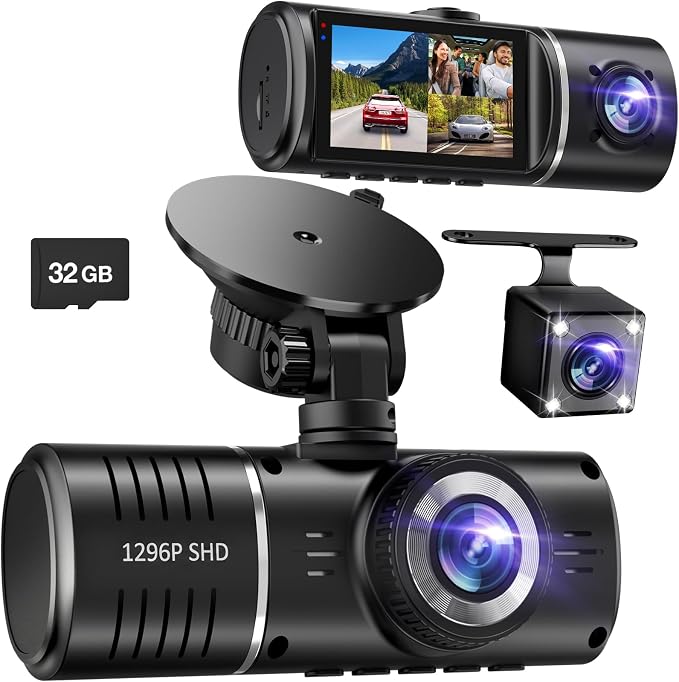
A 3-channel dash cam setup covers front, inside, and rear views with wide angles up to 170°. It works best for drivers seeking comprehensive coverage around their car plus clear visuals on a 3.47-inch IPS screen, helping catch everything without blind spots.
Setting it up means mounting three cameras, windshield for front and inside, and a waterproof one at the rear. It connects via USB and saves clips on a microSD card with loop recording to keep storage manageable.
Emergency incidents lock footage automatically, triggered by the built-in G-sensor, which proves handy during parking too.
Recording video at 1296p resolution and 30 frames per second delivers clear footage, and the three-camera design handles all angles well. The build feels solid with useful app control.
Common issues relate to the learning curve for positioning all three cameras correctly and occasional confusion navigating settings on the small screen.
The camera system’s biggest strength is capturing front, rear, and inside views all at once, giving drivers confidence in a range of driving situations. The most frequent downside comes from adjusting the cameras and navigating controls on the 3.47-inch screen, which isn’t always intuitive without referring to the manual.
People who want full visual coverage of their vehicle will appreciate how much this model reduces blind spots and protects footage. Drivers looking for a simpler or one-camera solution may find this setup more complex than necessary for basic recording needs.
Pros
- Three-camera coverage reduces blind spots well
- Emergency recording locks files automatically
- Clear visuals on IPS display from any angle
- Waterproof rear camera adds outdoor durability
Cons
- Setup requires careful positioning for all cameras
- Settings can be tricky with small screen navigation
Specification Details Video Capture Resolution 1296p Field Of View 170 degrees Mounting Type Windshield Mount Control Method App Screen Size 3.47 inches Frame Rate 30 FPS 8. REDTIGER F7NP 4K Dual Dash Cam
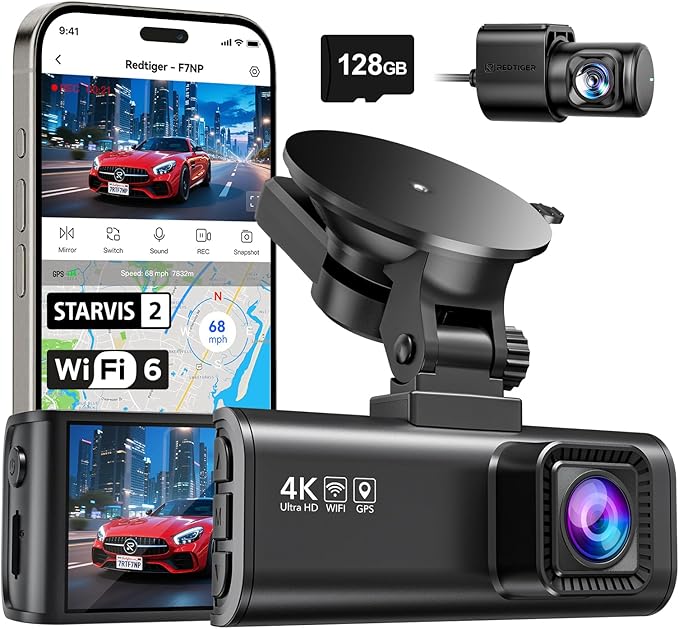
Drivers who want clear, detailed footage from both front and rear cameras will find this dash cam suits well. Ideal for commuters, road trips, and rideshare drivers, it excels at capturing sharp 4K front video alongside 1080P from the rear.
Its standout feature is the high-resolution dual recording with wide-angle lenses that cover a broad field of view.
Setup is straightforward with a windshield mount and app control for easy adjustments without fiddling with buttons. The built-in Wi-Fi lets you connect to your phone quickly to check footage. Thanks to the free 128GB memory card, storage is ample out of the box.
Loop recording and a G-sensor handle recording management automatically, which keeps things simple during daily driving and parking.
Video quality impresses both day and night thanks to the STARVIS 2 sensor, F1.5 aperture, and wide dynamic range for balanced lighting. The camera’s compact design makes it unobtrusive on the windshield.
Most praise revolves around its sharp 4K front footage. Some users mention that the screen size of 3.16 inches can feel a bit small for detailed playback directly on the device.
Sharp 4K footage from the front camera captures clear details under all lighting conditions, while some find the 3.16-inch screen too small to review videos comfortably on the device. The built-in GPS and loop recording add reliable functionality but don’t provide a large viewing experience on the unit itself.
Those wanting crisp, high-resolution recording with easy app interaction will be happy here. Drivers needing a larger screen for video playback might look for alternative models better suited for on-device viewing during trips.
Pros
- Stunning 4K front and 1080P rear video
- Wide-angle lenses cover large field of view
- Built-in Wi-Fi with easy app control
- Free 128GB memory card included
Cons
- 3.16-inch screen feels small for playback
- Rear camera resolution lower than front
Specification Details Video Capture Resolution 1080p, 2160p Field Of View 170 degrees Control Method App Maximum Aperture 1.5 f_stop Connectivity Technology Wi-Fi 9. Lehwey 10.26 Inch Wireless Carplay Dash Cam

Wireless CarPlay and Android Auto support set this dash cam apart. Ideal for drivers wanting hands-free smartphone integration while on the road, it offers a large 10.26-inch screen that makes navigation and calls easy to manage. Its biggest strength lies in smoothly connecting to your phone and keeping control voice-activated without delay.
Setup involves pairing your smartphone via Bluetooth and Wi-Fi, which happens automatically after the initial connection, so there’s no need to fuss each time you drive. Day-to-day use is straightforward thanks to voice control that handles navigation, music, calls, and messages, helping maintain focus on driving.
Miracast and Airplay support allow screen sharing, adding to its versatility in daily routines.
Recording at 1080p resolution with a 170-degree field of view provides clear footage of events in front and behind the vehicle. The device mounts on the dashboard with an LCD display that stays visible without being intrusive. Reviews mention how dependable the wireless connections are, but some find the setup can be tricky initially without guidance.
Build quality feels solid and practical for everyday use.
Users appreciate the reliable wireless connection that remembers the last phone paired, making daily use simple once set up properly. The most common issue involves the initial setup process, which some find confusing without detailed guidance.
Great for anyone wanting easy smartphone integration and a large display for in-car multimedia. Drivers preferring straightforward setup or higher frame rates may want to explore other options.
Pros
- Auto reconnects to last connected phone
- Supports both Apple CarPlay and Android Auto
- Clear 1080p video recording front and rear
- Large 10.26-inch LCD touchscreen
Cons
- Initial setup can be complicated without instructions
- Frame rate limited to 30 FPS
Specification Details Screen Size 10.26 inches Video Capture Resolution 1080p Field Of View 170 degrees Connectivity Technology Bluetooth, Wi-Fi Memory Storage Capacity 64 GB Mounting Type Dashboard Mount 10. AProX 3 Channel 4K Dash Cam

AProX 3 Channel 4K Dash Cam offers full coverage with three cameras capturing the front, rear, and cabin in impressive detail. Ideal for anyone who wants comprehensive recording from all angles, its standout feature is the front and rear cameras both shooting in 4K resolution, delivering sharp footage for complete road safety documentation.
Setting it up involves mounting it on the dashboard and connecting via Bluetooth or Wi-Fi for easy app control. Daily use benefits from wide viewing angles, 170° front, 150° rear, and cabin, ensuring minimal blind spots. The cabin camera’s IR lights handle nighttime interior recording, while the included free 128GB microSD card and support for up to 512GB of external storage mean plenty of space for long trips or parking monitoring.
Recordings are clear and detailed, even in low light thanks to advanced HD night vision with WDR. The build is rated for higher heat and cold conditions, making it reliable for different climates. Praise often highlights the clear 4K video quality.
Complaints sometimes mention the push-button controls could be more intuitive when navigating settings manually.
Most appreciate the crisp 4K front and rear video quality that captures every detail on the road. The main drawback mentioned is the push-button controls, which can feel awkward when adjusting settings without the app.
The dash cam suits drivers wanting thorough coverage with high-resolution footage, especially those valuing night recordings inside the car. People prioritizing simpler controls or higher cabin camera resolution might want to explore other options.
Pros
- True 4K footage from front and rear cameras
- Wide viewing angles reduce blind spots
- Built-in cabin IR lights for night recordings
- Comes with a free 128GB memory card
Cons
- Push-button controls not very user-friendly
- Cabin camera only records in 1080P
Specification Details Video Capture Resolution 4K Front + 4K Rear + 1080P Cabin Field Of View 170 degrees (front), 150 degrees (rear and cabin) Connectivity Technology Bluetooth, Wi-Fi Memory Support Free 128GB Memory Card, Up to 512GB External Storage Mounting Type Dashboard Mount Special Features 24H Parking Monitor, HD Night Vision, IR Lights in Cabin 11. iZEEKER 2.5K Front Dash Cam
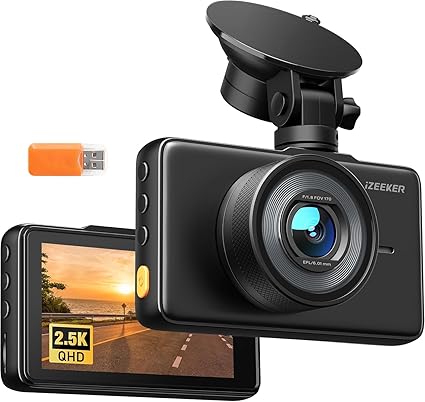
Getting clear video from the front of your car without complicated setup is what drives this dash cam’s appeal. It suits anyone wanting a trustworthy camera that captures wide road views and key details like license plates.
The strongest feature is its high-resolution 2.5K recording combined with a broad 170-degree lens for thorough coverage.
Setting it up takes just minutes thanks to the suction cup mount and straightforward instructions. The 3 IPS display lets you quickly check footage without needing any phone connection. Physical buttons help you control the camera easily while on the road, avoiding distractions.
It auto records continuously and switches to emergency recording when triggered.
Video quality is sharp enough to distinguish signs and plates well under normal daylight. The build feels solid with an optical CMOS sensor and a bright f/1.8 aperture for decent light capture.
Positive feedback highlights how simple the setup and controls are, but the screen size limits detailed viewing of longer clips directly on the device.
Clear recording with wide coverage is a frequent compliment for this dash cam, offering solid evidence for road incidents. Most mention the small screen as a drawback when reviewing footage directly, which means using other devices might be necessary for detailed checks.
Those wanting a straightforward, high-quality front dash cam without requiring complex installation will be satisfied. Drivers needing dual channel recording or larger display might want to consider other options.
Pros
- Sharp 2.5K QHD video quality
- Wide 170-degree coverage
- Easy physical button controls while driving
- Simple suction cup mounting and setup
Cons
- Small 3″ screen limits in-device footage review
- Only front-facing recording, no rear camera included
Specification Details Video Capture Resolution 2.5K (2560×1440P @30fps) Field Of View 170 degrees Screen Size 3″ IPS Mounting Type Suction Mount Control Method Touch & Physical Buttons Parking Monitoring 7/24 Supported 12. 70mai T800E 4K Three Channel Dash Cam

Perfect for rideshare drivers and families wanting full coverage, the 70mai T800E 4K Three Channel Dash Cam stands out by recording front, inside, and rear simultaneously in high resolution. It’s especially valuable for capturing detailed footage anytime you’re driving, adding a layer of security that fits many vehicle types.
Setting it up mainly involves attaching the three cameras to the windshield and rear, and you can control it by voice or app, which makes day-to-day use simple. The Wi-Fi 6 connection means you transfer videos quickly to your phone, and the 64GB SD card handles plenty of footage before needing to offload.
Night vision and HDR mean it records clearly during late hours without fuss.
It delivers sharp, detailed images front and back, with clear license plates and road details even in low light. The build feels solid on the windshield, not too bulky for daily driving. The most common praise is how well the night vision works, but some mention the inside camera’s IR feature switches can be tricky to manage at first.
Footage quality at night receives high praise due to HDR and noise reduction technology. Some find adjusting the interior camera’s IR settings requires patience and learning to avoid confusion. Transferring files wirelessly via Wi-Fi 6 is noted as a definite convenience in daily routines.
Drivers who want comprehensive, multi-angle protection will find this ideal, especially those who need inside and rear views for ride shares or family safety. Those who want a larger display directly on the device or simpler interior camera controls might look at alternatives.
Pros
- Records front, inside, and rear simultaneously
- Clear footage day and night with HDR and 3D noise reduction
- Fast video transfer using Wi-Fi 6
- Includes a large 64GB SD card for storage
Cons
- Inside camera IR switch can be confusing
- Small 1.9-inch screen may limit direct viewing
Specification Details Video Capture Resolution 4K Front +1080P Rear+1080P Inside Connectivity Technology Wi-Fi 6 Special Features 3-Channel Recording, 64GB SD Card Included, Built-in 5-Mode GPS, Voice Control Field Of View 402 degrees Control Method App, Push Button, Voice Best Portable Dash Cams Comparison Table
Product Resolution Connectivity Storage Included Parking Monitor 4K Front Mini Dash Cam 4K 2160P Wi-Fi, 5G Wi-Fi Free 32GB Card 24 Hours 4K Dual Dash Cam 4K Front + Rear Bluetooth, Wi-Fi Free 128GB Card 24H 70mai A810 Lite Dash Cam – 5GHz Wi-Fi 6, USB – 24H Garmin Mini 3 Dash Cam 1080p Bluetooth, USB, Wi-Fi – – ROVE R2-4K Dual Cam – USB, Wi-Fi – – 360 View 4-Channel Dash Cam 1080p USB, Wi-Fi – – 3 Channel Front Rear Cam 1296p USB – – REDTIGER F7NP Dual Cam 4K Front and Rear Wi-Fi Free 128GB Card – Lehwey Wireless Carplay Dash Cam 1080p Bluetooth, Wi-Fi – – AProX 3 Channel 4K Cam 4K Front + Rear Bluetooth, Wi-Fi Free 128GB Card 24H iZEEKER 2.5K Front Cam 2.5K 1440P Powerline – 7/24 70mai T800E 4K Triple Cam 4K Front + Interior + Rear Wi-Fi 6 64GB SD Card – 1. 4K Front Mini Dash Cam- Resolution4K 2160P
- ConnectivityWi-Fi, 5G Wi-Fi
- Storage IncludedFree 32GB Card
- Parking Monitor24 Hours
2. 4K Dual Dash Cam- Resolution4K Front + Rear
- ConnectivityBluetooth, Wi-Fi
- Storage IncludedFree 128GB Card
- Parking Monitor24H
3. 70mai A810 Lite Dash Cam- Resolution–
- Connectivity5GHz Wi-Fi 6, USB
- Storage Included–
- Parking Monitor24H
4. Garmin Mini 3 Dash Cam- Resolution1080p
- ConnectivityBluetooth, USB, Wi-Fi
- Storage Included–
- Parking Monitor–
5. ROVE R2-4K Dual Cam- Resolution–
- ConnectivityUSB, Wi-Fi
- Storage Included–
- Parking Monitor–
6. 360 View 4-Channel Dash Cam- Resolution1080p
- ConnectivityUSB, Wi-Fi
- Storage Included–
- Parking Monitor–
7. 3 Channel Front Rear Cam- Resolution1296p
- ConnectivityUSB
- Storage Included–
- Parking Monitor–
8. REDTIGER F7NP Dual Cam- Resolution4K Front and Rear
- ConnectivityWi-Fi
- Storage IncludedFree 128GB Card
- Parking Monitor–
9. Lehwey Wireless Carplay Dash Cam- Resolution1080p
- ConnectivityBluetooth, Wi-Fi
- Storage Included–
- Parking Monitor–
10. AProX 3 Channel 4K Cam- Resolution4K Front + Rear
- ConnectivityBluetooth, Wi-Fi
- Storage IncludedFree 128GB Card
- Parking Monitor24H
11. iZEEKER 2.5K Front Cam- Resolution2.5K 1440P
- ConnectivityPowerline
- Storage Included–
- Parking Monitor7/24
12. 70mai T800E 4K Triple Cam- Resolution4K Front + Interior + Rear
- ConnectivityWi-Fi 6
- Storage Included64GB SD Card
- Parking Monitor–
How to Choose the Right Portable Dash Cam
Choosing a portable dash cam means looking at video quality, how easy it is to install, and reliable storage options to guarantee clear recordings and smooth use. Prioritizing these features helps avoid costly replacements and problems with important footage when it matters most.
Video Quality
Footage that’s grainy or choppy quickly becomes useless when you need clear proof in an accident or insurance claim. Resolution and frame rate really affect video clarity; most solid dash cams record at least 1080p at 30fps, which captures smooth and detailed images.
Higher frame rates like 60fps add fluidity, especially in fast-moving scenes. Night vision is crucial if you drive frequently in poor light or at night. Infrared LEDs or advanced sensors help maintain clarity without blinding glare, making license plates and street signs readable after dark.
Wideangle lenses make a big difference by capturing more of the surroundings. A lens around 140 to 170 degrees reduces blind spots and records side lanes and intersections better. Cameras with narrower views often miss important details from the edges of the road.
Picking a dash cam that balances resolution, frame rate, night vision, and lens angle ensures the footage is practical for real-life driving scenarios.
Power and Battery
Continuous power is often overlooked but critical. Battery-powered models offer portability but typically only run for about 30 minutes to an hour on a single charge, which can be too short for full trips or parked monitoring. Those with capacitors handle heat better and tend to last longer without failures.
Hardwired devices connect directly to the vehicle’s power supply, allowing them to stay on while parked and even when the engine is off, if wired properly. This setup avoids dead batteries and supports parking mode, which records impacts or movements around the car.
Recharge times vary but quick charging isn’t always a top priority as long as the device handles long rides or parking periods well. Choosing a power source depends on whether recording while parked is important and how often you want to swap batteries.
Portability and Mounting
Size and weight dramatically affect how easy it is to install and hide the camera. Bulky or heavy units can be distracting and might block parts of your windshield or rearview mirror. Compact dash cams weighing under 100 grams usually stay out of sight and stay firmly mounted without frequent adjustment.
Mounting options vary from suction cups to adhesive pads. Suction cups are easy to remove and reposition but may lose grip in extreme temperatures, while adhesive mounts provide more stability but at the cost of easier removal. Generally, installing or removing a dash cam without tools simplifies cleaning or swapping devices between vehicles.
Look for mounts that secure the device tightly so it doesn’t shake or move during rough roads.
Storage and Connectivity
Most dash cams rely on microSD cards for storage, with support commonly up to 128GB or 256GB. Larger capacities mean longer footage before overwriting begins. Loop recording ensures the camera records continuously by overwriting the oldest files automatically, which prevents storage from filling up and stopping the recording.
Without loop recording, you’d risk missing crucial events simply because the memory ran out.
Wireless connectivity such as Wi-Fi or Bluetooth adds convenience by letting you transfer video files straight to your phone or laptop without removing the memory card. This feature speeds up evidence retrieval and streamlines sharing footage when needed.
Some cameras also offer dedicated apps that make browsing and backing up clips more manageable.
Safety and Features
A built-in G-sensor plays a key role in detecting impacts or sudden movements. It automatically locks recordings around collisions so they don’t get overwritten, preserving critical evidence without manual intervention.
Without this, important clips might be erased during regular loop recording cycles.
GPS logging records location and speed, which can corroborate events during disputes or insurance claims. Some dash cams even provide extra layers of safety with driver assistance technologies like lane departure alerts or forward collision warnings, though these features depend on the model.
While not necessary for everyone, such features can alert drivers to risky situations and improve overall awareness during trips.
Optimizing Dash Cam Placement for Maximum Coverage
Positioning a dash cam correctly is crucial to capturing clear footage and covering all critical angles. Most portable dash cams perform best when mounted near the rearview mirror, centered on the windshield.
This placement minimizes obstruction within the driver’s view while providing a straightforward alignment with the road ahead.
Ensure the camera lens is clean and angled slightly downward to avoid capturing unwanted reflections or excessive sky. A horizontal level helps maintain a balanced field of view. Avoid placing the camera too low on the windshield; this often results in poor visibility of license plates and important details.
Consider these points for better coverage:
- Use a quality adhesive or suction mount for steady positioning.
- Check that the camera lens does not get blocked by the car’s interior features.
- Test video recordings after installation to verify the view includes the entire road lane and some side areas.
Proper placement directly affects the value of recorded evidence in case of accidents or incidents.
Essential Maintenance Tips to Prolong Your Dash Cam’s Lifespan
Regular upkeep keeps a portable dash cam functioning correctly and extends its service life. Start by cleaning the lens with a microfiber cloth to avoid scratches and ensure clear footage. Dust and smudges degrade image quality and may hide crucial details.
The power cable and connectors deserve attention too. Inspect these components for wear or damage periodically. Loose connections can cause intermittent power loss or disruptions in recording.
Additional maintenance tips include:
- Format the memory card every few weeks in the dash cam to prevent file corruption.
- Avoid exposing the device to extreme temperatures for long periods, which can affect battery and electronics.
- Update the dash cam firmware when manufacturers release patches or improvements.
Following these steps ensures reliable operation and preserves video data integrity over time.
Comparing Portable Dash Cams with Hardwired Models for Different Use Cases
Portable dash cams and hardwired models both provide essential recording capabilities, but their applications differ based on installation and use scenarios. Portable units offer flexibility; they can be easily transferred between vehicles and typically require no professional installation.
Hardwired dash cams connect directly to the car’s electrical system. This allows features like parking mode, where the camera records even when the car is off. However, installation demands more effort and sometimes professional help to avoid damaging the vehicle’s wiring.
Use cases for each type:
- Portable dash cams suit drivers who rent cars often or want a quick setup.
- Hardwired models work well for those who wish to monitor their car continuously, especially when parked.
- Hardwired systems generally provide cleaner wiring and don’t clutter the cabin with cables.
Choosing between them depends on usage needs, budget, and willingness to manage installation complexity.
People Also Asked
How Do I Install a Portable Dash Cam in My Car?
A portable dash cam usually installs by mounting it on the windshield using a suction cup or adhesive mount and plugging it into the car’s power outlet. Position the camera to get a clear view of the road ahead without blocking the driver’s sight.
What Is the Average Battery Life of a Portable Dash Cam?
Most portable dash cams have a battery life ranging from 30 minutes to a couple of hours, intended mainly for short-term use when the car is parked. It’s best to keep the camera plugged in while driving for continuous recording.
Are Portable Dash Cams Compatible with All Vehicle Types?
Portable dash cams generally work with all vehicle types, including cars, trucks, and SUVs, because they connect via standard power outlets or USB ports. Double-check the mounting size to make sure it fits your windshield shape.
How Do I Clean and Maintain a Portable Dash Cam Lens?
Clean the lens gently using a microfiber cloth and avoid household cleaners that can leave residues. Wiping the lens regularly helps maintain clear video quality, especially if the camera is exposed to dust or moisture frequently.
What Are Common Issues with Portable Dash Cams and Fixes?
Common problems include poor video quality, camera freezing, or power connection issues. Restarting the device, ensuring proper power supply, and updating firmware often resolve most issues without needing professional help.
Conclusion
Choosing a portable dash cam comes down to video quality, ease of installation, and reliable storage options. Clear footage helps with understanding incidents, while a device that’s simple to move between vehicles adds convenience. Storage should support enough footage for your typical driving habits without frequent card changes.
Consider how often you’ll use the dash cam and the space available in your vehicle before making a choice. Matching these factors with your budget ensures you don’t pay for features you won’t need.
Take another look at the comparison table and the detailed picks above to find a fit that works for your daily driving needs.

I’m Tyler Brooks, a car care and automotive writer who loves keeping vehicles clean, protected, and running smoothly. I cover detailing techniques, paint protection, interior cleaning, fluid checks, and easy DIY maintenance. I create practical guides that help everyday drivers take care of their cars inside and out without spending a fortune.